 apps
apps
Custom Auto Redirects
Custom Auto Redirects automatically send visitors to a different URL based on their geolocation, without showing any widget or prompt.
Redirect List
Manage your auto-redirect rules from the main dashboard.
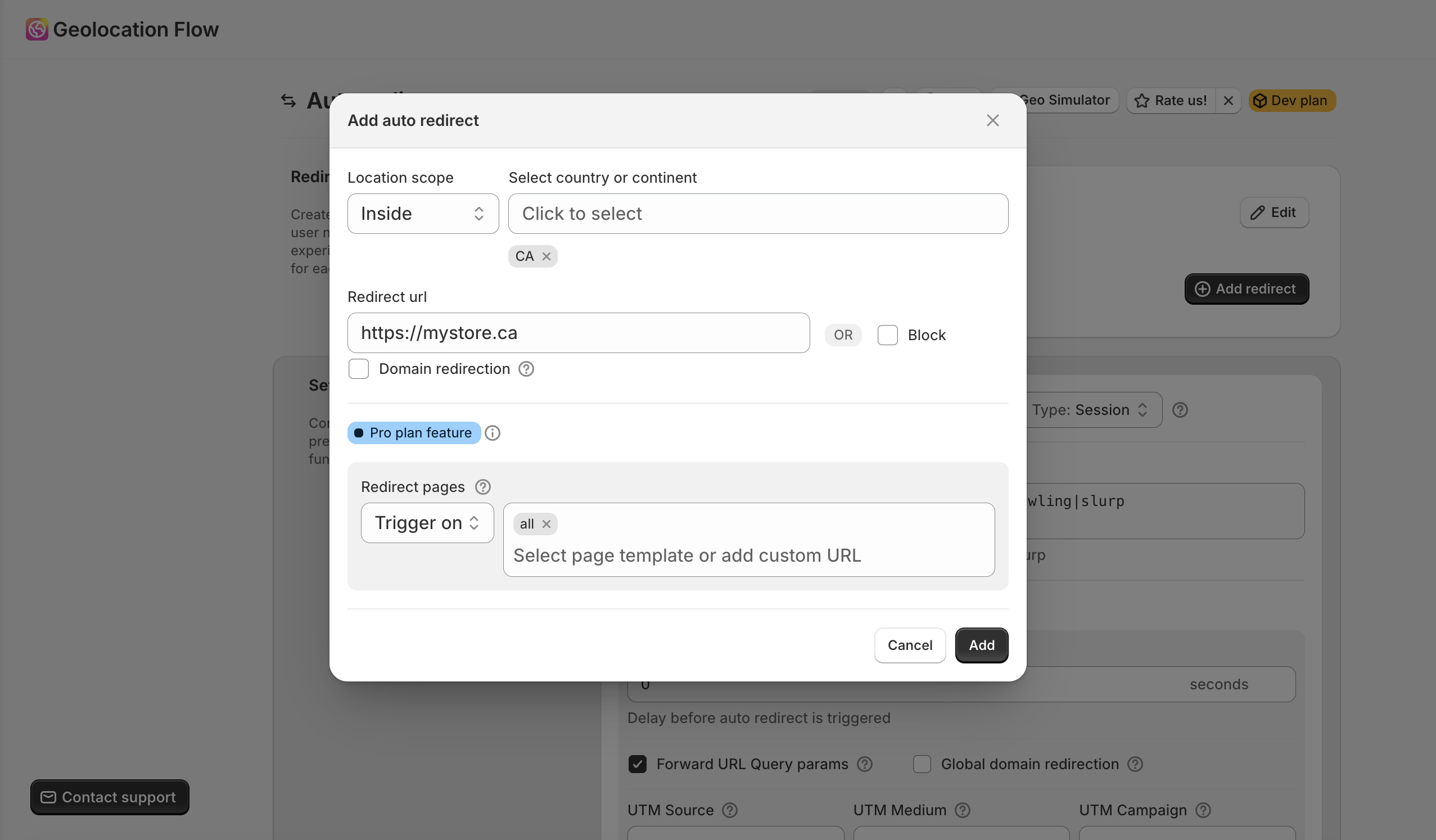
Adding an Auto-Redirect
- Go to Geolocation Flow Dashboard → Custom Auto Redirects
- Click Add redirect
- Select the target locations — choose countries or continents
- Set the geo logic:
- Inside — redirect visitors who are in the selected locations
- Outside — redirect visitors who are not in the selected locations
- Enter the destination URL
- Save your changes
Redirect Options
| Option | Description |
|---|---|
| Domain redirection | Keep the same page path when switching domains (e.g., /products/shirt stays the same) |
| Block visitors | Redirect to about:blank instead of a URL (blocks access) |
| Status | Toggle between Active and Draft |
| Order | Drag to reorder — first matching rule wins |
Page Targeting (Pro)
Pro plan only. Control which pages trigger or skip auto-redirects:
- Trigger mode — only redirect on selected page templates
- Skip mode — redirect on all pages except selected templates
- Available templates: index, product, collection, page, blog, article, cart, 404, search, account pages
Free plan: Up to 1 auto-redirect. Pro plan: Unlimited auto-redirects.
Auto-Redirect Settings
Redirect Once
When enabled (default), visitors are only redirected once per session or per cookie window, not on every page load.
- Session — redirect once per browser session (resets when the browser closes)
- Cookies — redirect once per cookie window (resets after 7 days)
Bot Detection
Geolocation Flow automatically detects bots and crawlers to prevent them from being redirected. The default detection pattern covers common bots:
bot|adsbot|googlebot|crawler|spider|robot|crawling|slurp
You can customize this regex pattern in the settings to add or remove bot user-agent strings.
Redirect Delay (Pro)
Pro plan only. Set a delay in seconds before the redirect fires. This gives visitors a moment to see the page before being redirected. Set to 0 for instant redirect.
Forward URL Query Params (Pro)
Pro plan only. When enabled, the current page’s URL query parameters are forwarded to the redirect destination. This preserves tracking codes, referral parameters, and other query strings across the redirect.
Global Domain Redirection (Pro)
Pro plan only. When enabled, redirects preserve the current page path when switching to a different domain.
Loop Prevention
Geolocation Flow appends ?xgar=1 to redirect URLs by default to prevent infinite redirect loops. You can disable this parameter in settings if needed.
Related Docs
- Geo Targeting Rules — understand how location matching works
- UTM & Tracking — add UTM parameters and track redirects
- Custom Auto — cookies, query params, and custom JS rules