 apps
apps
Geo Targeting Rules
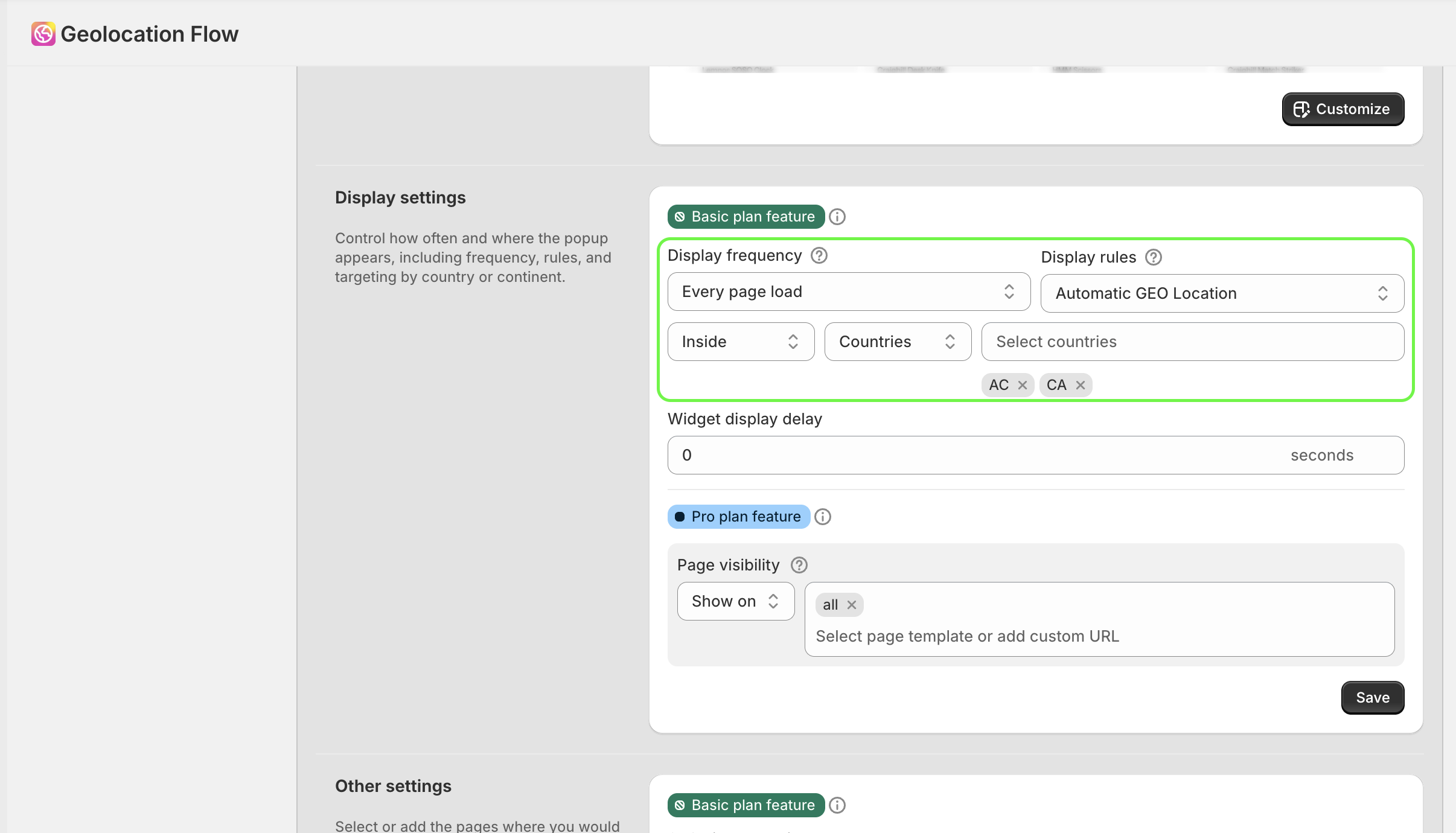
Geo targeting rules control when and to whom your widget or redirect is shown, based on visitor location.
Display Rules
Choose how the widget is triggered:
| Rule | Description |
|---|---|
| Automatic GEO Location | Show the widget based on the visitor’s detected geolocation (most common) |
| Automatic (non GEO Location) | Show the widget automatically to all visitors, regardless of location |
| Manual (on custom element click) | Only show the widget when triggered by a custom element click (e.g., a button with data-xgeo-open) |
Geo Display Logic
When using Auto Geo Location, choose the matching logic:
- Inside — show the widget to visitors who are in the selected locations
- Outside — show the widget to visitors who are not in the selected locations
Example: To show the widget to everyone except US visitors, select “United States” and set the logic to Outside.
Location Types
Continents
Target visitors by continent. The 7 available continents are:
| Code | Continent |
|---|---|
| AF | Africa |
| AN | Antarctica |
| AS | Asia |
| EU | Europe |
| NA | North America |
| OC | Oceania |
| SA | South America |
Countries
Target visitors by specific country. All countries recognized by the ISO 3166-1 standard are supported (240+ countries and territories).
EU Auto-Select
When selecting countries, click EU to automatically add all 27 European Union member countries: Austria, Belgium, Bulgaria, Croatia, Cyprus, Czech Republic, Denmark, Estonia, Finland, France, Germany, Greece, Hungary, Ireland, Italy, Latvia, Lithuania, Luxembourg, Malta, Netherlands, Poland, Portugal, Romania, Slovakia, Slovenia, Spain, and Sweden.
How Geo Detection Works
Geolocation Flow utilizes Shopify’s built-in geolocation detection to determine a visitor’s country and continent. The app does not access or store visitor IP addresses — all location data comes from Shopify’s native geolocation API. This data is available as a geolocation object with the following properties:
country— ISO country code (e.g.,CA)country_name— full country name (e.g.,Canada)continent— continent code (e.g.,NA)
Geo Targeting in Auto-Redirects
Auto-redirect rules (both Custom and Markets) have their own per-rule location settings:
- Each auto-redirect rule specifies its own list of target countries/continents
- The Inside/Outside logic is set per rule
- Continents in auto-redirect rules use a
C:prefix internally (e.g.,C:NAfor North America)
See Custom Auto Redirects and Markets Auto Redirects for details.
Default Settings
| Setting | Default |
|---|---|
| Display rule | Automatic GEO Location |
| Location type | Continent |
| Selected continents | North America (NA) |
| Geo logic | Outside |
Related Docs
- Display Settings — control frequency, delay, and page visibility
- Custom Widget Redirects — the widget these rules apply to
- Custom Widget — custom JS rules for advanced geo logic